WELCOME TO OUR INFO PAGES!
Here you'll find important and useful information about our service: We appreciate you checking these pages before contacting us. Otherwise we live for great customer service, so just call us at #### if the solution isn't found here!
OFFLINE PROJECTCAM
The first step in any support case is always that we ask for a visual confirmation that the camera unit is connected to power: This is because 99% of cases where a ProjectCam goes offline unexpectedly are caused by a power outage or unstable power at the site.
PROJECTCAM FROM A TO Z
If you're not already familiar with us this is a good introduction to how we operate the service. For ProjectCam to work correctly, the following is required:
Mobile coverage (minimum 4G)
Stable and secure mounting of the camera unit
A standard power outlet (230v) with stable power
A. First, have a chat with us about your project so we can get the information we need to give you a good quote (number of cameras, placement etc.).
B. Once the agreement is in place we configure the camera unit, register the project and ship the PC unit by post to the specified address while invoicing for the first rental period.
C. When you receive the package mount the PC unit (see mounting), then call us for activation and fine-tuning.
D. The PC unit is now connected to our systems and is already saving images to your image archive.
E. When the project is over, the ProjectCam is returned to us: The project is not considered finished until the unit is returned. Use our contact form (choose logistics and accounting) for returns.
Å? Finally we deliver a professionally edited timelapse video: You can find examples here.
PRIVACY & GDPR
ProjectCam units are generally not classified as video surveillance.
To cover the last recommendation we also offer signage for the construction site that you can order via our order form. Otherwise, we are generally very focused on privacy and will always go a long way to protect those working on site.
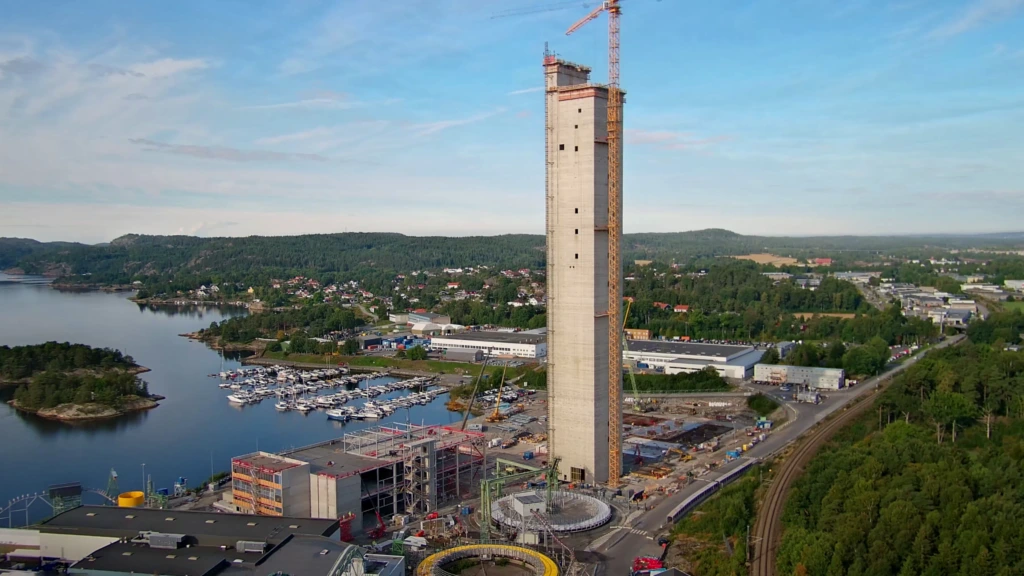
This image was captured with a ProjectCam
For ProjectCam to be legally used it must be mounted so that individuals cannot be identified in the images. Our 4K cameras have a motorized zoom lens with a recognition distance of 17 meters at wide angle (fully zoomed out) and 46 meters at full telephoto (fully zoomed in).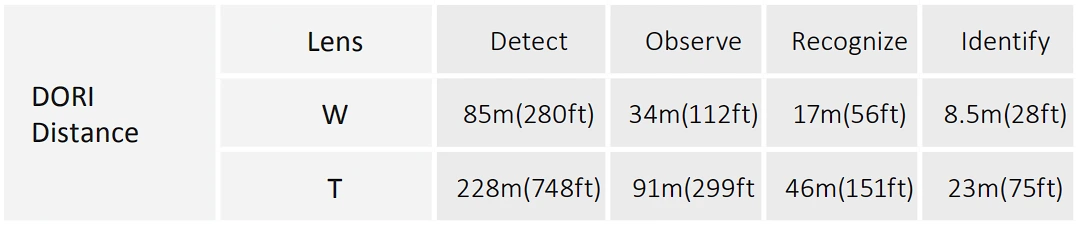
We have developed a new customer portal and will gradually phase out version 1 (kunde.byggekamera.no). All customers who ordered ProjectCam after August 2025 will be placed in version 2 of the platform (app.byggekamera.no). You can read more about why here.
All users get their own individual account: There are two user levels in PC 2.0 — admins and users. Regular users and project administrators. Admins have the same features as users but have access to a couple of extra functions.
We have ensured that all functionality from ProjectCam Version 1 is preserved, but it now exists in a much more intuitive and streamlined package. We will also be adding more features over time.
In addition to the features listed below, you can contact us for help to:
Mask out parts of the image.
Change the storage and update interval.
Set a time delay on image publishing.
FOR USERS (USER AND ADMIN)

Here you can browse the images ProjectCam has stored for the projects you are associated with: Either using the arrows below the image or by selecting a day and time from the calendar.
“Download image” only downloads the image displayed on the page, and the “expand” button in the upper left corner enlarges the image to 4K resolution if you want to examine something more closely.
You will find the download options “Image Archive” and “Video” under the “download” tab to the right of the viewing image on the camera page.
Image Archive will generate a zip file containing all the images from the selected interval, while the “video” submenu will auto-generate a timelapse from the selected interval (note that this is not the same as our professionally edited timelapse videos).
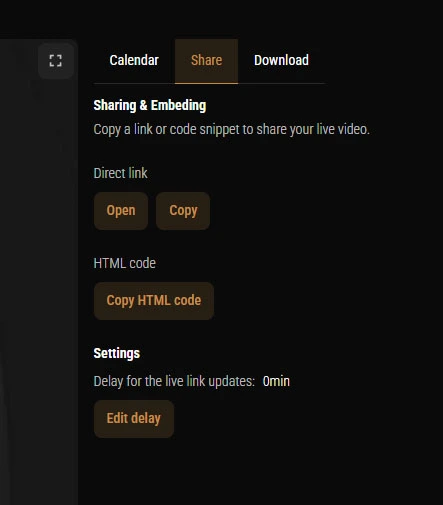
You can now choose who should receive the download link by email by entering an email address and clicking “add”. You must also enter your own email address if you also want the link (so that you can choose not to receive all links you generate for others).

NOTE: If the project administrator has password-protected the share link, the HTML code will not work.
FOR ADMINISTRATORS (ADMIN ONLY)
Click the kebab menu (the three dots on the right) on the project and "edit users":

On the next page click "+ add new user" (also on the right side):
Then enter the name and email address of the user you want to invite and their role (we recommend no more than two admins per project). The user will now receive the same type of invitation you received when you click "invite user":
Click the kebab menu and select "edit details":
On the next page you can change the project information:
It is very useful for us to know where in the country the camera is located, but if you don't have a complete address yet, just enter the postal code and city. These two fields also fetch the weather data for your camera pages.
OBS: Remember that "project name" must contain the project name you provided when ordering the camera so that our references match.
You can also upload your own company logo which will be displayed on the share link and in the HTML code (we recommend a .png file without background, but feel free to contact us if you don't get the result you want).
The share link can be password-protected from the kebab menu at the camera level, both in your project overview:
And on the camera page:
NOTE: If you password-protect the share link, the HTML code will no longer work on websites, as the live image is no longer considered public.

The image can later be unlocked from the same menu, but the option is then called "Unlock image".
IMPORTANT: ProjectCam should not be mounted in trees or tower cranes as these move a lot in wind and weather and will result in blurry images. If the image frame changes too much between each image it will be pointless to deliver a edited project video at project completion even though it is included in the price.
1. Unpack the PC unit and find the bag with the adjustment key
2. Mount the PC unit on a wall or pole and connect to power
3. Loosen the adjustment screw until you can move the camera head
4. Roughly adjust the direction of the camera angle

Note that the cover around the "camera ball" can also be rotated for more horizontal mobility.
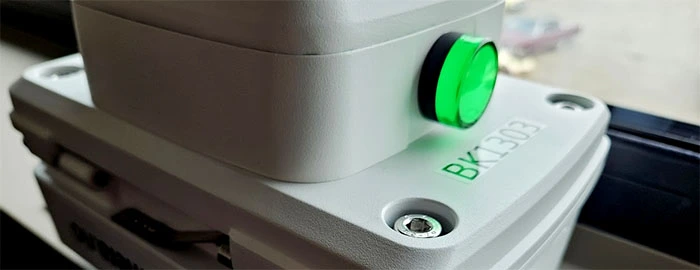
5. Check that the PC unit has power: A green power indicator light activates a couple of seconds after the camera unit is connected to power. You will find the light just below the camera lens on the PC unit.
6. Find the PC number on the unit (on a label just below the indicator light) and call us at 45 04 02 04. Tell us you are in the process of mounting a camera and provide the PC number — we will activate the unit and assist with fine-tuning the image frame.
FREQUENTLY ASKED QUESTIONS (GENERAL)
Why do I need to call you during mounting?
Can you give me access to a colleagues ProjectCam project? (Customer portal)
We are also very careful about sharing information about our projects, so such issues should be resolved internally within your company.
Can you remotely control the camera angle?
Who owns the images and videos?
My construction project is of a sensitive nature. Can it be exempt from public access?
Sometimes we put extra work into the included project videos for marketing purposes, so the only downside is that this possibility falls away. Otherwise we have extensive experience with privacy and security, as the company behind ProjectCam is a technology company working with surveillance and other security technology.
ABOUT TIMELAPSE
When can I expect to receive the edited timelapse video?
Generally the videos are delivered within 1-4 weeks after the project is completed, and we can also prioritize the most urgent videos.
Can the music in the video be changed?
You can find music with open licenses yourself, but there are no guarantees that such music will not be registered with copyright in the future or otherwise be caught by copyright algorithms. The music we use today is produced in-house and we own the rights so you can feel confident you are not breaking any laws.
Can you customize the included timelapse video for us?
For more extensive work such as animations, timelines and custom text this falls under "Custom Timelapse". See add-on multimedia services .
Can you remove the ProjectCam logo from our video?
IF YOU DIDN'T FIND THE ANSWER YOU WERE LOOKING FOR:
Contact us via our contact form (any time) or call us at #### (during normal working hours). We respond quickly and always prioritize a great experience for our customers.
(Org. Nr. 812 170 252). We are located in the same premises in Halden, but work in quite different ways.
GDX is primarily a distributor of security electronics and therefore works exclusively with installers and resellers — not end customers. This is why the need arose to create the "ProjectCam" service, both to avoid confusion from different customer groups and to focus even more sharply on the construction industry.
A major reason GDX has been named a "Gazelle company" three years in a row (2020–2022) is the company's focus on product development and system integrations. ProjectCam is one of the results of this work, and testifies to the high level of expertise the company possesses.